

Alogent Webinar: Exception Tracking and Reporting with AccuAccount
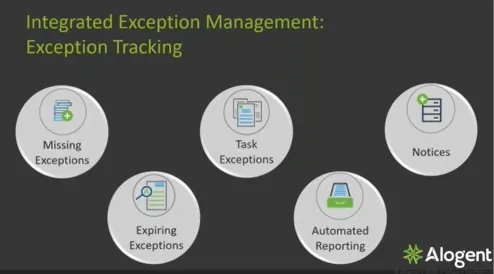
So I'm Jen Mitchell. I'm the VP of sales for AccuAccount, here at Allagint. Accu account has two main features. We've got the imaging and the exception tracking. Most will use them together. They'll have an integration. And, where that where that integration plays in is if you have the imaging and you have the exception tracking. As you gather images, it will start to clear those exceptions, or you can use exception tracking only, which is what we're really gonna focus on today and look at today. So when we talk about integrated exception management or exception tracking, we do a couple of different types of exceptions. We do missing exceptions. And what that means is is that is truly when an exception you have to have that document, within the bank or the financial institution, and then you would be able to clear those missing exceptions. With the imaging, as you put them into the software, it'll automatically clear those. With just the track only, somebody will have to go in there and mark them that they that you have received them, within the bank or financial institution. Then we have expiry exceptions. And expiry exceptions are your true documents that truly expire like your insurance, UCCs, something that has a true expiration date on it. And as you gather those documents, you can actually change the expiration date within Accu account. It'll clear the exception. And then, you know, if it's set for five years out like the UCC would be, you would set it to that date in five years. Six months before with a lead time built out on those exceptions, you would get notification that you have a UCC that is expiring on this specific loan. Then we have task exceptions. Task exceptions allow you to really have a free formed, type of exception out there. These are utilized when you need to really put a note out there. Like, maybe you need to contact the customer for something. Or let's say you received some documentation, but maybe the co borrower missed an initials on page three of that document. You can actually put that task out there. You can even set some reminder dates so it's in the future to reach out to them if it's maybe for us. You need to, do an inspection of some type. Those task exceptions are very free formed, and we also have task groups with those task exceptions. Task groups will generate out you can, set those to generate out and they can go out all at one time or just sequential. But you can set those really for, like, maybe a status if you go from, post like, maybe your post closing review. You have certain tasks that have to be done. Or if it from a deposit standpoint, maybe it's a new account or maintenance change, you'd have those task lists out there, and then you would mark them off as you go. The task lists are nice because it will actually, it'll keep the information out there. You're always able to go out there and see who took care of something, date and time stamp on it. You can reassign those, and those could even be assigned to groups. And then we have automated reporting. All of our documents, which, are I'm sorry. All of our reports that are generated out of AccuCount can be emailed to individuals or groups or, you know, management can receive reports on a quarterly basis, those types of things. So anything that you want to get out to your user, your lenders, your end users, your management, those can be scheduled. You do it one time, and they automatically run. And then we also generate notices. So at new account, obviously, you're trying to get those exceptions. You're trying to gather this information. You're reaching out from a lender standpoint, lien lending assistance standpoint, but now you need to generate out some information to request that from your account holder. You can go ahead and generate out this notice via email, or you can still send a standard letter today. And those notices, when they generate out, they will automatically be emailed, and you could put a link on there to your portal, whatever portal you might use, where they can then gather those documents and send them over to you. Most portals will have some kind of notification letting you know that they're out there, and then you can go out and move those documents in and mark those documents as received. So what do we do? Some of the biggest things that we do here, with the Accu account product is, obviously, big thing, we integrate to your core. So when we talk about integrating to the core, we're talking about, that nightly batch file that we'll import into Accu account. This brings over any account holder, account information, updates to statuses, balances, and any of that information that's brought over nightly. It will it will change within Accu account if things are changed within the core. Nice thing about this is is let's say that a loan goes from, an open status to a closed status. When it does that, you can stop tracking on those active exceptions and start traffic checking on maybe a paid out, list of exceptions that you have. With with, the imaging, we have our interfaces with our esign. So as we, you esign documents or you send those esign process wise, your doc prep system will send that those documents to be esigned out to your customer. They esign that information, send it back. With our imaging piece, we will actually after we've done that port import, we'll pick up any documents that were esigned and import them into Accu account automatically for you. Same thing with the LOS. We can actually bring over those images that you might have gathered during the the loan application process. We'll place them into the credit and and loan side as needed. And we can also bring over data from LOS. So if there's some information that you wanna see from your loan origination system, we can bring that over and put it into what we call our flex field, and then you can manage all of that relationship in in that, in Accu account. And then we have a product called Corelink. Corelink allows you to move from anything into Accu account. This is our product. So it actually does a screen scrape, and it will take you on over into Accu account, show you that customer and that account you might be looking at. Maybe you're doing a credit report or maybe you're reviewing a spreadsheet. You do that control all day, hotkey, look up, take you on over into Accu account, and you're able to view that information. So what we do, if you were to decide that you wanted to move forward with Accu account or Accu account track, we will come in and we'll do the install. This is an on prem, solution. And we'll install this AccuCampus blank system, and then we walk you through an implementation. So during that implementation, you're assigned a coach from Allegiant, and that project manager, that coach is gonna, help you build out the system so that it fits your specific needs. During that time and it's usually, twelve to sixteen week time period. During that time, they're also going to share best practices with you, work with you weekly on, during meetings, building out your system where you can do verification of the system, installing the data, doing, you know, data, analysis. All of those things are gonna be done during that implementation. So, when you're done with that implementation, we're gonna do a training with you. That training is going to get you up and going, and you're gonna be able to do everything that we can do within the product. And so that will happen before go live. You'll have your go live, and then, there will actually be a transition meeting from the implementation to the support team after that. So the agenda that we're gonna look at today, we're gonna look at the customer page, the layout, talk a little bit more about that data and what it looks like. The exception tracking, we're really gonna look at document exceptions, task exceptions reporting, from a standard reporting and dynamic reporting standpoint. So those are the things we're just gonna look at very high level today. So I'm gonna go on and go over into my Accu account. Alright. So this is AccuCount. This is what we call a customer page or an account holder page within our product. The main focus of it is just so that you can really have one set of customer requirements or exceptions or images, and they will tie to that that, one account holder's complete account portfolio. So here's all the loans. Here's all the deposits and trust. Of course, we have a lot of, security behind each of those tabs, including the credit, the customer side tab, where you can determine who can see what. But we do try to bring that whole relationship into one place for you. So on the left hand side here, we have anything that is associated back to amalgamated. Amalgamated and all the information that you see here all came over from the core. So that's that that data that we import nightly in that batch file. Here's the loan information that we imported, from the core as well. What we do is is we actually will do some type of mapping to say, if it's this code within the core, it's gonna be this loan type in Accu account. So, again, something that we build out and work with you during the implementation and get you up and going, on the system. So when you come in and and you start this process, you'll have a complete, system of all of your backlog customers and accounts that you've brought over from the core. Again, there's some things that we can do with that, but you would have a set already of of, customers, accounts, collaterals, everything within Accu account based off of that implementation. So along with each of the loans, so if I look at my list of loans here and I actually have some applications and some other things out there. But I also can import in collaterals or I'll receive collateral information. This is nice, especially from a tracking standpoint. So when you do tracking on multiple collateral, when the end user or the lender gets that report, they're going to be able to read that report and know exactly what recorded mortgage deed of trust you need because the description is gonna flow over into that report. So that's why it's nice to break those apart, have those separate on the, on the customer page with the descriptions, and even their own specific requirement list. So here, this is the mortgage real estate. Here's what we require for a mortgage real estate. But I have another UCC type and a couple of, titled goods here. So there's some different requirements for each of those, which will they would see and they would know just based off of that account type. We also help financial institutions manage their cross collaterals. And, what that does for you is is that allows you to actually tie tie these collaterals together if you're using it on multiple loans. And then you're only gathering those documents one time, so you're only marking those exceptions as received one time in the system. You're not having to go out to the five or six times that you have across and mark it. Okay. Very high level on the data and the information that you see here. Just wanted to give you a high level overview. Now we're gonna talk a little bit about each of the exception types. So first of all, we have what we call the document exception. Document exceptions are your missing, expiring, and expired exception. They are very easily seen right here on this page. So if I have agree, it means that, the document exists. Might be in another imaging system, might system, might be paper, wherever it might be. And then I have the red dot, that means that it doesn't exist. So those red are going to be what we would consider an exception. Those are a missing document exception. K? Then we have our expiring exception. So this is a date in the future. And and when I look at this on a report, I will actually see that it's going to expire, and it's gonna be set at at what we call a pending exception status. And, it will also notify me once it becomes an exception. So if you don't resolve it before the pending is expired or before the exception is expired, it will flip it over to an expired exception. And then another visual of an actual expired document here. This borrowing base expired on one thirty one of twenty twenty three. One of the big features that we offer on the customer side or any document tab actually is is our document scheduler. This allows you really to, build out exactly what document requirements you have for this relationship. So amalgamated, you need quarterly financials from them. You set a schedule on the financials, and it will automatically build you out your new document tab showing that you have a red dot, which will tie back to an exception. So as of July first of twenty twenty three, it built me up this new financial statement here and put a red dot, and it's showing on my report as a missing financial statement. So that doc scheduler automatically does that for you. And then not only can you customize, you know, that relationship or that, those schedules, you can also really customize what you see here or, you know, configure what you see here. So if this particular revolving line of credit, had maybe you required some SBA documents from this customer, you can go out there and activate those groups easily, turn those on, and start tracking for those SBA documents automatically. So it's really just allowing you to not just have this real big list of of everything that is going is missing and expired, but it allows you to really customize it to know exactly what you need for this relationship or this account or collateral. It also will allow you to build out some different tab names. So let's say you wanted to track guarantees separately. Maybe John Smith and Laura had two different guarantees that you had signed. This gives you the ability to lay those out separately so that you know, oh, yes. I have both of them. You know, maybe go back to your paper file or your imaging system and look for both of those, saying that you have them separated in there as well. So just allows you to do some customizing even down to the document tab name. There, you can see I've I've actually changed the coloring to red, and I did update it on nine eighteen of twenty twenty one on that promissory note. So you can make some notes on those as well so that it's very noticeable when you come into this relationship. So from a document standpoint, you can see that very easily here. You also have the ability to click on the exceptions tab on each of these sections. So on your your credit documents, your loan documents, and your collateral documents, they all have different, layouts here. Over my other one actually. I think it's better. So you can see that you for each piece, you have your own list of information that you're missing or expiring. Along with that, you could easily identify, the tasks and the policies and the task groups. So let's just look at this a little bit high level. Here on the customer side, I have my insufficient income as a policy exception. Very noticeable that it has this p here. Those policy exceptions will actually show on a report separate from any of your others, or you can type them to your report your standard report if you'd like. We have this task exception that is assigned to an individual because it's missing a signature. So that's those free formed, exceptions that I was talking about. And then we have what we call our task list. So this task list was generated out on this particular mortgage for post closing review to individuals as well as groups. So if somebody from that group, that processing department could come in here, mark this as resolved, and, again, all of that information is saved on this loan forever. It'll show you who resolved it, date and time stamp, ask questions. They can reassign, do all types of things, make comments, whatever they need to do on those. So from a customer page standpoint or relationship standpoint, this is really what it looks like. This is, again, more probably a little bit more of an admin function or maybe somebody that does some cleanup on some exceptions. But lenders do have the ability to come in here, view this information, and even make comments that they reached out to a customer or they've talked to, you know, this account holder on this specific loan, on this specific document. So they have a lot of flexibility in adding comments, just not being able to change any of the statuses. So from a reporting standpoint and where how lenders will actually receive this information, we have a couple different ways. So first of all, we have our dynamic reports, and these are, these are actually built reports by you. You can, use some of our templates that we have available. You can build out your own. These are not exception specific. These are also any data that you might wanna get out of the software. So I'm actually going to go over, and I'm going to look at an exception report by officer. And we could do it just I mean, again, these are kinda broke out, so we could do it by an account or by credit. I'm just doing a general one, so it's everything. But what I've done is that you can come out here and pick the fields you'd like to add into your report. So anything coming off of that that customer page or that account holder page, you can pick which fields you want. You can even decide where you wanna see them on the report, do a lot of building out and customizing what you wanna see. Some of them use this. You know, some lenders wanna see their their reports in certain ways. Some wanna see certain information. Some maybe want it sorted a certain way. This is where you would be able to do that, and then share these these reports with them. You can even do some filtering on these reports. The big thing is what's nice about these is it's not only do you have the ability to build these out and put them in any order you want, but you can also group them. So if I wanted to maybe just do this by officer, name, and then maybe I wanted to group it by, an account type, I can absolutely do that. Now I have Alex Haley, all of his commercial real estate exceptions, all mortgage, exceptions, so on and so forth. Now those reports, those dynamic reports are can actually be seen by users as they come into the system within their dashboard. So this is a dashboard. These are reports that I have shared onto, my or these are reports I have shared onto my dashboard. Sorry. And each individual user can have their own set of whatever they'd like to see here. I happen to just be looking at exceptions by by customer, by officer, maybe filtered on me, exceptions by branch, expiring documents. So this is really just everything all in one place for them, very easy. And, again, you can have three or four different reports or maybe just one report that that is so important to them that they could put that out here on their dashboard and be able to track that and look at that on a daily basis. And then the last type of exceptions I do want or reporting I do want to point out to you is just just our standard reports. These really are just reports and how you want to sort the data. So you can do it by assigned user, by branch, by category, by officer, obviously, the most popular. When you build out one of these reports or if you were to view one of these reports, you really do some filtering and querying on the data, and then you schedule these to go out automatically. So this can go out on Monday mornings at eight AM or if lenders want that, some of them want them on Thursday afternoons at four o'clock, whatever whatever your time is on on setting those up. And then when the lenders get them in their email box, this is what they look like. So they're laid out nicely with Mary Shelley. She's got two hundred and thirty three, exceptions, and it just lists them out for them. They are able to click on these links. It will take them back over into Accu account where they can make any comments or look at the whole relationship or give that customer a call because that customer information contact information is on that page. So they have the ability to do all these types of things just pulling up this report within their email. Alright. We're gonna jump back over to this PowerPoint. Just some additional benefits I just didn't mention at the beginning, and then we'll do a q and a. So just so you know, you can put any customer or any account type in here. It doesn't have to be specific to a commercial loan. It could be mortgages. It can be consumer loans, titles, whatever it might be. You can also use it for deposits, so any of your checking, savings, we've imported CDs, IRAs, whatever it might be. You can this is an unlimited user system, so you can allow as many users as you would like into the system. And there was different security levels. So you didn't have really somebody who can really view it and then another person who might be able to do edit and then admin who can add things and update things and, build out new, new document types or new exceptions or whatever it might be. And we do have a quality control functionality in the track only. The QC functionality allows you to actually go out and quality control those images that you have in another system, and you can mark it off as QC within Accu account that somebody verified it. You could pull a report, export it out into PDF, Excel, and then share that with others just to know that you did do that quality control within even a a separate imaging or paper class. Alright. So at this point, we're gonna go ahead and, there is a, a chat in the GoToWebinar or there's a questions panel in the GoToWebinar. Feel free to ask any questions that you would like. I do have a few already. So let's see. Can my financial institution build our own reports in Accu account? So there is like I said, in that accu, or in the dynamic reporting, you have the ability to build out not not just exception reports, but also data reports. So I hope that answers your question. Can I have more than one missing financial exception for a customer in Acu account? So, actually, there's a little example here. Say I didn't get last quarter's financials. When it comes up to the next quarter, will I have two exceptions? Yes. So our system, if you have two missing financials or four missing financials, it will example I used, every quarter, it'll show you a new one, and it'll be named out like that. So it'll say financial accept financial statement for July of twenty twenty three, April of twenty twenty three, so on and so forth. So, yes, it will just keep a tally of those. And as you gather them, you can mark them off individually rather than having just that one tab to do all of that. Alright. And I'll take one more question, and then we'll finish this up since I promised to only take thirty minutes of your time today even though I had some technical difficulties. So can lenders add comments, and can they be seen on the exception reports? Yes. So lenders can add comments to the individual, documents or exception. They can add their comments if they reached out to them, so so on and so forth. And then those will be seen back on the report. So if they've added ten, comments, they'll show on the report. So that is something that we do have available as well. Alright. Any other questions that you may have, I just want you to know when when we respond and send you the information that the recording from today, we will also answer any additional questions you had. So I see that there might be a few more, so we'll get those answered for you. And, obviously, if you have, any questions specific questions or you wanna see a one on one presentation, please feel free to reach out to us. You can go to elligent dot com, and there's a contact us form. Fill that out. And, again, we'll be sending you that email so you can respond to that email, and we look forward to talking with you in the future. I hope you all have a wonderful day. Thank you.
Is your bank or credit union looking for a way to streamline its imaging and exception management? AccuAccount was built for financial institutions like you! Watch this 25 minute webinar to learn about the integrated exception management features available in AccuAccount, including:
- Customer page to track customer and member credits, collateral, loans, deposits, and trusts in a single source of truth
- Exception tracking for missing exceptions, expiring exceptions, task exceptions, automated reporting, and notices
- Standard and dynamic reporting
AccuAccount gives banks and credit unions the power to automate every aspect of exception tracking. To learn more, request a demo today!