Getting Started

Unify makes it easy to extend mobile remote deposit capture into your institution’s existing mobile app. This page outlines the technical requirements for integrating Alogent’s Unify solution with your mobile banking platform. It includes an integration checklist, sample API request, and key considerations to help guide setup, testing, and deployment.

Integration Overview

Capabilities

Unify supports multiple integration approaches depending on your institution’s needs:

  • Mobile RDC Image Capture: Leverage the device’s native camera for deposit image capture
  • Commercial SSO Support: Integrate with Alogent’s UI via identity providers such as OpenID Connect or SAML
  • API Integration: Direct integration with the API or through our middleware for seamless connectivity
  • Core Support: Compatible with Corelation, Symitar, Miser, and other leading core platforms

Key Considerations

  • Workflow must be validated in CAT before production deployment.
  • Limit enforcement should align with FI policies.
  • Ensure integrator IPs and certificates are coordinated early to avoid delays.
  • Consider performance impact when choosing API submission method.
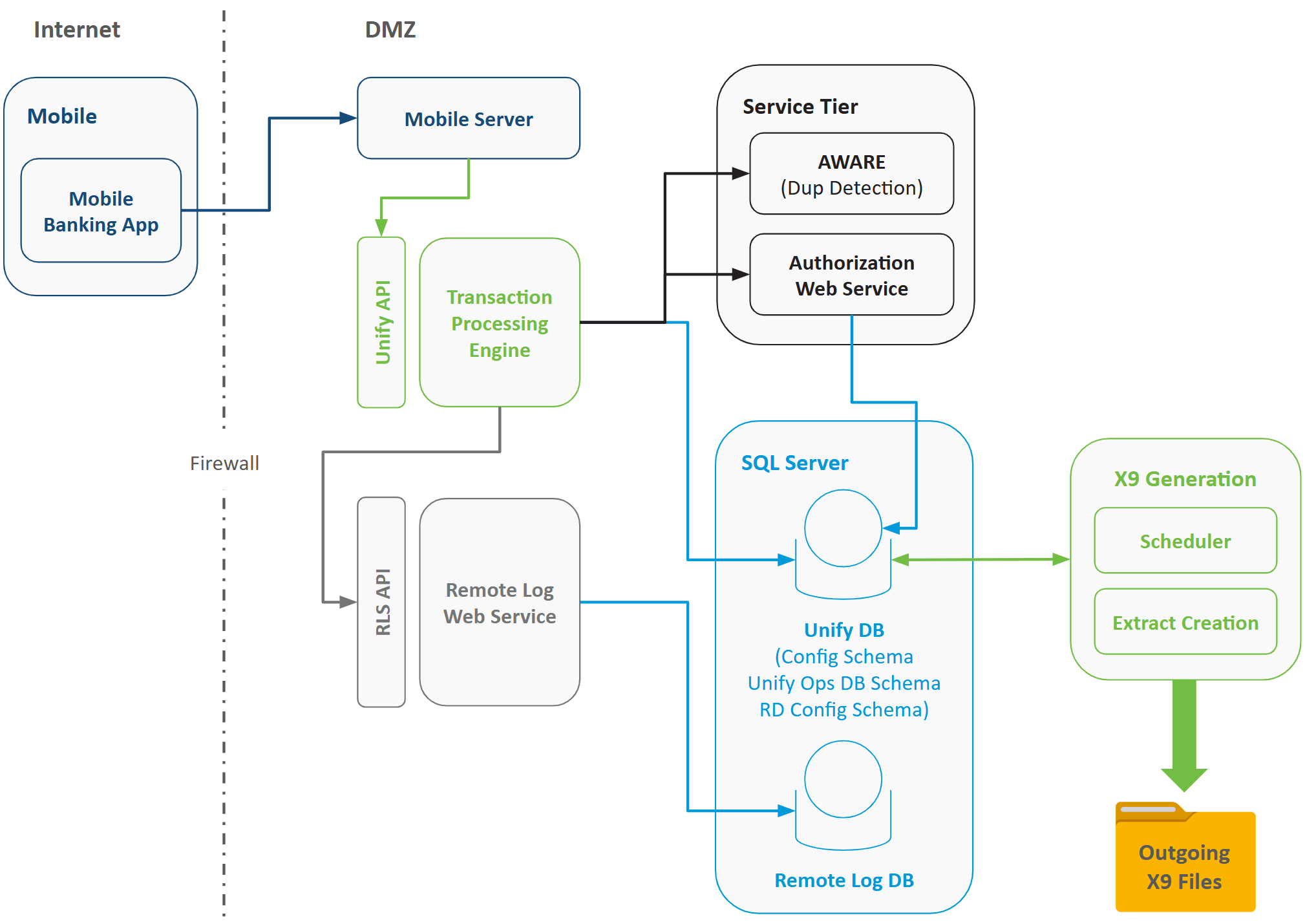
  • Workflow diagram available upon request.

Integration Checklist

1. API Origin 

  1. Where will API calls originate?
  2. Typical: RDC, provider’s webserver, FI location

2. Client Certificate for CAT Testing

  1. Required? Yes / No

3. Integrator IP Whitelisting

  1. Has integrator provided IPs to Alogent for whitelisting?
  2. Once the IPs are provided, a Salesforce ticket will be created for those IPs to be whitelisted on the Alogent WAF, as part of this Salesforce ticket, a private Cert will be generated by the Data Center and provided to the integrator for the CAT environment. 

4. Deposit Submission Method

  1. /simple-tran/capture-tran (recommended)
  2. /complex-tran (not recommended; requires multiple calls)
  3. Deposit item capture: Single item / Multiple items

5. Limit Enforcement

  1. In-app enforcement (limit rule name via API call; requires core mapping)
  2. Limit definitions via API Unify Provisioning

6. Limit Enforcement Workflow 

  1. Options: Flag for FI Review / Reject Upfront / Deny Over-Limit Deposits in Mobile App
  2. Note: Need to test both options with the integrator since the FI requirements may be different.

7. Deposit History Display

  1. Integrate with Unify transactions/get API to retrieve current user’s deposit history
  2. Verify how the deposit history is invoked.

8. Batch Posting & Notifications

  1. If no, to the question above, notify Alogent Services Team and FI that a batch posting extract would need to be configured
  2. Provide notification service URL/endpoint
  3. Provide IP addresses for whitelisting to receive requests from Unify; include DC request #

9. Member Notifications

  1. Required? Yes / No

10. Sample API Request

  1. Example deposit request using the Unify API endpoint:

POST {alogent-base-url-path}/api/simple-tran/capture-tran

{
 "returnCodelineDetails": false,
 "images": {
   "jpeg": {
     "frontImage": "**REDACTED**",
     "rearImage": "**REDACTED**"
   }
 },
 "sourceDevice": {
   "id": "ABCDEFG"
 },
 "extendedInfo": {
   "expectedTransactionTotal": 5
 },
 "authenticationInfo": {
   "financialInstitutionID": "**REDACTED**",
   "fiAccessClientID": "**REDACTED**",
   "fiAccessSecret": "**REDACTED**",
   "userID": "**REDACTED**",
   "channelName": "Mobile",
   "remoteDepositInfo": {
     "corporateId": "corporateId***definedInAlogent",
     "entitlements": {
       "userType": 1,
       "userRoles": [1],
       "accounts": [
         {
           "number": "**REDACTED**",
           "description": "Sample Savings",
           "isMobile": true
         }
       ]
     }
   }
 },
 "depositAccount": {
   "number": "**REDACTED**",
   "description": "Sample Savings",
   "isMobile": true
 },
 "amount": 5
}

Workflow Diagram