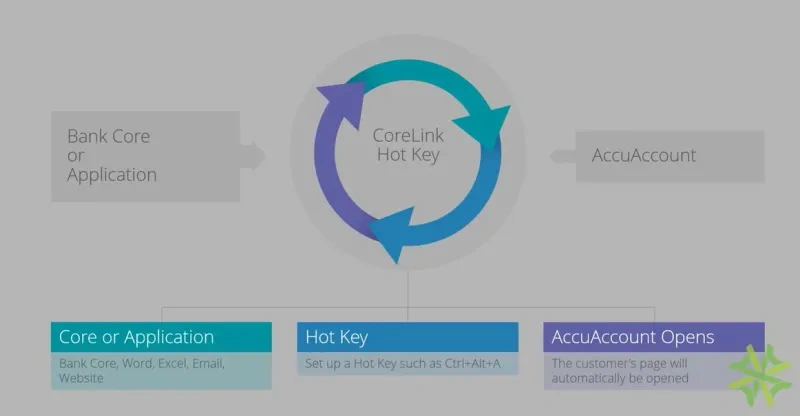
Welcome to AccuSystem's demonstration of CoreLink. CoreLink is used as an interface between your bank's core and AccuAccount, but can also be used to open a customer page in AccuAccount from other programs as well. It gives users the ability to easily pull up a customer or account in AccuAccount by using a hotkey out of any open application. The purpose of CoreLink is to save your users time. With the direct link between any application with customer data, such as your bank's core system, you will eliminate the time spent opening your AccuAccount website, signing in, and then searching for your account or customer. It also eliminates the possibility of typing errors when searching. Crawling can be used when working in any application such as Microsoft Word, Excel, an Internet page, email, or your bank's core system. Let's take a look at how CoreLink works. The first screen that we see is a customer's page in a bank's core system. To launch AccuAccount, I will use my hotkey, which is control alt a. CoreLink can be set up to either do a search on your entire monitor for a customer or account number, or the selection mode can be enabled to select the number you're wanting to open in AccuAccount with crosshairs. AccuAccount opens in a new window, signs me in automatically with specific permissions, and takes me directly to the customer's page to view documents and exceptions for my customer. In this next example, I'm working on a spreadsheet that has customer and account information for multiple customers. Once I hit my hotkey, Ctrl Alt A, my crosshairs will display if I'm in selection mode and allow me to choose the customer numbers or account numbers I'd like to search for. Since more than one customer number was on the spreadsheet I was viewing, when AccuAccount launches, it opens up to the search results showing only the customers and accounts that were on my spreadsheet. From there, I can choose which customer to view. CoreLink is a great complimentary product for AccuAccount. It allows your users to quickly move from your bank's core system or any other document to AccuAccount.
Find what you’re looking for faster with CORELink, a hotkey lookup feature for AccuAccount. CORELink automatically runs a query, based on the information displayed on your CORE screen. In doing so, the system will launch your exception management system and simultaneously search for the associated information displayed from the CORE.
How does CORELink work? This short demonstration video walks viewers through a simple 3-step process:
- The banker hits “Control+Alt+A” on his or her keyboard.
- CORELink checks for any customer and account information on the banker’s screen.
- CORELink launches AccuAccount and returns the matching customer(s) and account(s).
CORELink eliminates the need for performing manual searches. Banks that use this tool regularly report increased productivity and a more streamlined workflow. To learn more about how CORELink can enhance AccuAccount, request a demo.